
使用maxwell实时同步mysql数据到消息队列(rabbitMQ)
maxwell(麦克斯韦)官网:http://maxwells-daemon.io/
配置mysql
需要mysql开启binlog,而binlog默认是关闭的,需要开启,并且为了保证同步数据的一致性,使用的日志格式为row-based replication(RBR),新建或修改my.conf开启binlog。
1 | [mysqld] |
重启mysql, 查询是否已开启bin
1 | show variables like '%log_bin%' |
| Variable_name | value |
|---|---|
| log_bin | on |
| sql_log_bin | on |
配置jdk环境(略)
安装Maxwell
在https://github.com/zendesk/maxwell/releases这里下载对应版本。
解压,修改config.properties.example为config.properties,然后根据自己的实际情况修改配置
配置rabbitMQ环境
配置maxwell发送消息到rabbitMQ
修改maxwell的config.properties
1 | # tl;dr config 生产环境配置为info级别 |
启动maxwell
1 | ./bin/maxwell |
启动成功后,会自动生成maxwell库,该库记录了maxwell同步的状态,最后一次同步的id等等信息,在主库失败或同步异常后,只要maxwell库存在,下次同步会根据最后一次同步的id。
rabbitMQ控制台中会自动创建名称为maxwell的exchange(该exchange为config.properties中配置的)
新建Queue并绑定exchange,并设置routingkey为%db%.%table%(该routingkey为config.properties中配置)
可以使用rabbitmqctl 创建队列,交换机
- 创建交换机
1 | rabbitmqctl eval 'rabbit_exchange:declare({resource, <<"test">>, exchange, <<"ac.exchange.alarm">>}, direct, true, false, false, []).' |
- 创建队列
1 | rabbitmqctl eval 'rabbit_amqqueue:declare({resource, <<"test">>, queue, <<"ac.queue.alarm">>}, true, false, [], none).' |
- 绑定队列和交换机
1 | rabbitmqctl eval 'rabbit_binding:add({binding, {resource, <<"test">>, exchange, <<"ac.exchange.alarm">>}, <<"ac.routing.key.alarm">>, {resource, <<"test">>, queue, <<"ac.queue.alarm">>}, []}).' |
这三条命令执行后的最终结果是:在 test 虚拟主机下创建了 direct 类型的,持久化的,名为 ac.exchange.alarm 的exchange,创建了持久化的,名为 ac.queue.alarm 的queue,该队列以 ac.routing.key.alarm 的routing key绑定到了 ac.exchange.alarm 这个exchange上。其他参数为默认值.
MQ消费端
新建一个MaxwellData,接收数据
1 | public class MaxwellData implements Serializable { |
消费者代码
1 |
|
全量同步
使用maxwell-bootstrap命令
./bin/maxwell-bootstrap –database 库名 –table 表名 –host 127.0.0.1 –user 用户 –password 密码 –client_id config.properties配置的client_id
同步db.table表的所有数据,并指定client_id示maxwell_dev的maxwell执行同步
上一个命令先开着,然后再启动client_id=maxwell_dev的maxwell
./bin/maxwell –client_id maxwell_dev
等待执行完成即可
maxwell异常重启
如果maxwell挂掉,查询Maxwell数据库中的positions表
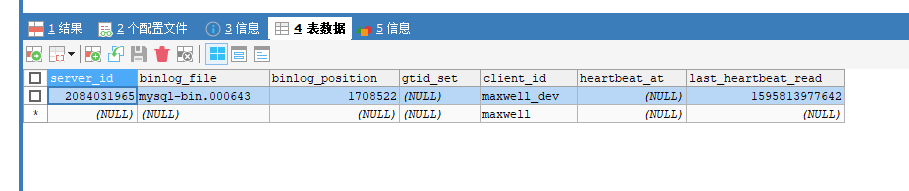
执行nohup bin/maxwell –init_position=mysql-bin.000620:4402754:1595320038718 >>server.log 2>&1 &
其中
–init_position=mysql-bin.000004:4:0
init_position参数mysql-bin.000004:4:0分别为:binlog文件名、position、mawell hearbeat
nohup bin/maxwell –init_position=mysql-bin.000620:4402754:1595320038718 >>server.log 2>&1 &